Key takeaways: FieldDojo's desktop app is Tauri 2 with a React front end, and it runs 152 files and folders copied unchanged from the React Native phone app. Stand-ins take the place of the React Native and Expo modules that code imports, and a script fails if a copy differs from the phone's. This only worked because the phone's logic was already separate from its screens. Sign-in, 3D and printing did not carry over and had to be built for desktop.
Why We Wanted One
FieldDojo is a jobsite app. Someone walks a job in the morning with a phone, runs the calculations there, and captures the rooms. The afternoon is office work: reading the walkthrough on a big screen, tidying the report, sending it. A phone is the wrong tool for that half of the day.
Clients ask us for the same thing in other words, usually "can we also have it on a computer". This post is what that took for one app, including the parts that didn't go to plan.
Copy the Files, Don't Port Them
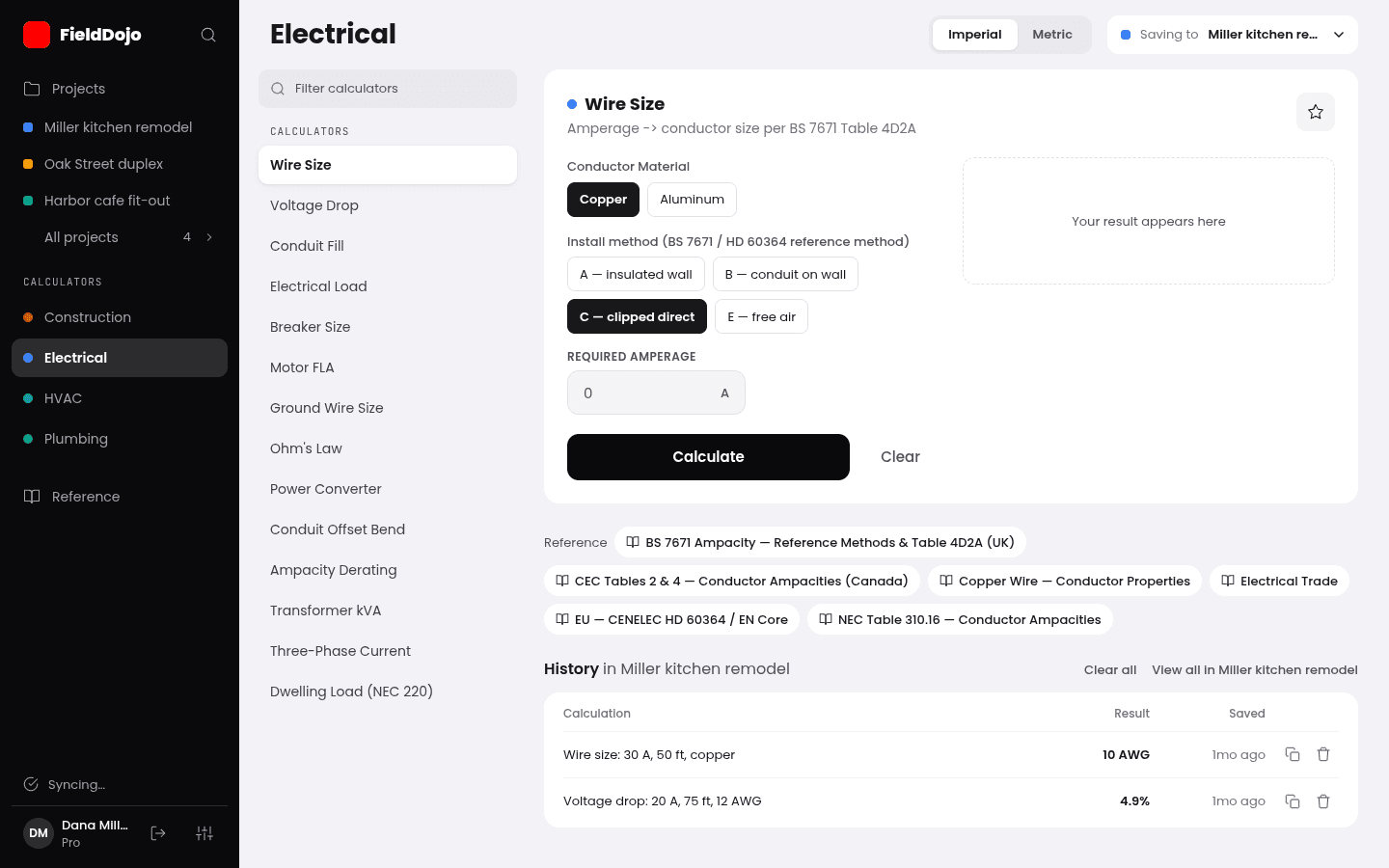
The phone app is React Native and Expo. The desktop app is Tauri 2 around React 19 and Vite, which means the interface runs in the operating system's own webview and a small Rust program holds the window, the local database and the file system.
A rewrite would have given us two copies of 65 calculators to keep correct, and the calculators are the one part of this product that can't be approximately right. So the desktop repository has a text file listing 152 paths that are taken from the phone repository byte for byte. The whole calculators directory is one of those paths. So are the unit and region rules, the sync rules, the database schema with its migration files, the walkthrough data layer, the report templates and the 360° viewer page.
Nobody edits a copied file in the desktop repository. A script compares every listed path with the phone's. The core of it:
while IFS= read -r p; do
  if ! out=$(diff -rq "$PHONE/$p" "$p" 2>&1); then
    echo "DRIFT: $p"; fail=1
  fi
done < scripts/copied-paths.txt
Taking a phone change is a second script that copies the listed paths across, followed by a person reading the diff before it's committed. It's a manual step and not a CI job yet. We'd like it to be one.
Stand-ins for React Native
Copied phone code imports React Native, Expo Router, Reanimated, MMKV, react-native-svg and the Expo file modules. None of those exist in a desktop webview.
Each one has a stand-in, a small module with the same name and the same exports that does the desktop equivalent. The react-native-svg stand-in returns ordinary DOM SVG elements. The MMKV one reads and writes the desktop's own key-value store under the same keys. The Expo file system one implements File and Directory over the app's data folder. TypeScript path aliases and a Vite alias point the imports at them, so the copied code never knows.
There are 14 stand-ins, and the rule for them is strict. A stand-in gets only what copied code actually imports. When a newly copied file fails the type check, that's the signal that a stand-in needs one more function.
The calculator screens themselves are copied too. What the desktop supplies is the four components they're built from (the numeric input, the segmented control, the result card and the section wrapper), written for a mouse and a wide window and keeping the phone's prop names exactly.
Where a Copy Wasn't Enough
A few files really do differ, and those are forks. Each fork is removed from the copied list and carries a header naming its differences from the phone's version, so whoever ports the next phone change knows what to keep.
The sync engine is the main one. Desktop SQLite enforces foreign keys and the phone's does not, so deleting a project has to detach its calculations first. Desktop also has no anonymous sessions. Work done signed out is claimed by the account at sign-in.
The database itself needed no fork. The Rust side runs the phone's own migration SQL files through Tauri's SQL plugin, and a test checks that list against the migration journal. All the Rust in the project comes to under 100 lines. It registers official Tauri plugins and has no custom commands.
What Did Not Carry Over
Signing in. Many phone users signed up with Apple and have no password to type into a computer. The desktop shows an 8-character code, and the phone approves it under Settings, Link a computer, typed or scanned as a QR code. This is the OAuth device flow, the same one a TV uses. The backend refuses approval from an anonymous phone session, so only a real account can pass its plan to a computer.
3D models. The phone draws its 3D calculator models through a native WebGPU module that has no desktop counterpart. For desktop we ported the model code by hand to three.js on the webview's own WebGPU, with WebGL 2 where there is none. It is the one place where a phone change now has to be made twice.
Printing. PDF export on desktop is the system print dialog. On macOS the webview has no print function inside a frame, so the report is placed into the main page, shown only to the printer, and the window is printed. Windows and Linux print from a frame as you'd expect, so this one only shows on a Mac.
The 360° viewer. It is the phone's own viewer page, but the app's content security policy blocks its inline scripts in the usual kinds of frame. It runs from a document written to the app's data folder and loaded over Tauri's asset protocol, with no access to the app's internals.
Capture. A computer has no way to sweep a room, so capturing a walkthrough stays on the phone.
One more thing in the same spirit. The macOS build is signed and notarised. The Windows installer isn't code-signed yet, so SmartScreen warns the first time it runs, and the download page says so.
How Long It Took
The first commit was on 20 September 2026. Version 1.1.0 went public on 4 November, about six and a half weeks later, and the repository has 131 commits today. Its test suite runs 1,532 tests, many of them the phone's own tests arriving with the files they cover.
The better test of the approach came two weeks after release. Phone version 1.5 added eight calculators, drawings on every result, and materials, tasks and a job timer on projects. Desktop 1.2.0 shipped on 20 November with all of it. The calculators arrived by copying a directory. The lists and the timer needed their hooks and rules copied and one new page section drawn. The 3D models were the hand port described above.
Would This Work for Your App?
It depends on how the phone app was built, and you can find out before spending anything.
It works when the app's rules live in plain TypeScript that doesn't import the screen. FieldDojo's calculators were pure functions from the start, for reasons that had nothing to do with desktop, and that is why 65 of them moved without a line changed. It also needs platform calls gathered in a few modules, so there is a small number of things to stand in for.
It works badly when business logic sits inside screen components, or when the app is mostly camera, sensors and other hardware a computer doesn't have. In that case a desktop version is closer to a second product, and it should be scoped and priced as one.
The FieldDojo case study has the full architecture, and what the app has cost since launch puts the desktop work in context. If you have a phone app and are wondering what a desktop version would involve, tell us about it. It rarely takes long with the code to tell which of the two cases you're in.