Key takeaways: FieldDojo 1.5 draws a 3D model for 25 of its calculators with three.js on react-native-webgpu. Each model is built by a pure function whose piece count is tested against the calculator's own result. An SVG drawing shows until the first GPU frame and stays as the fallback. The feature raised the Android minimum from API 24 to 26, and one fallback bug only showed on builds older than the library.
What We Were After
FieldDojo is a calculator app for the trades. Until November a result was a number with its formula and the code section behind it. A stair calculation gave you 15 risers at 7.2 inches, and you pictured the stair yourself.
Version 1.5 puts a drawing on every result, and for 25 calculators the drawing is a model you can turn with a finger, pinch to zoom and open full screen. The stair has its real number of risers. The stud wall has its studs.
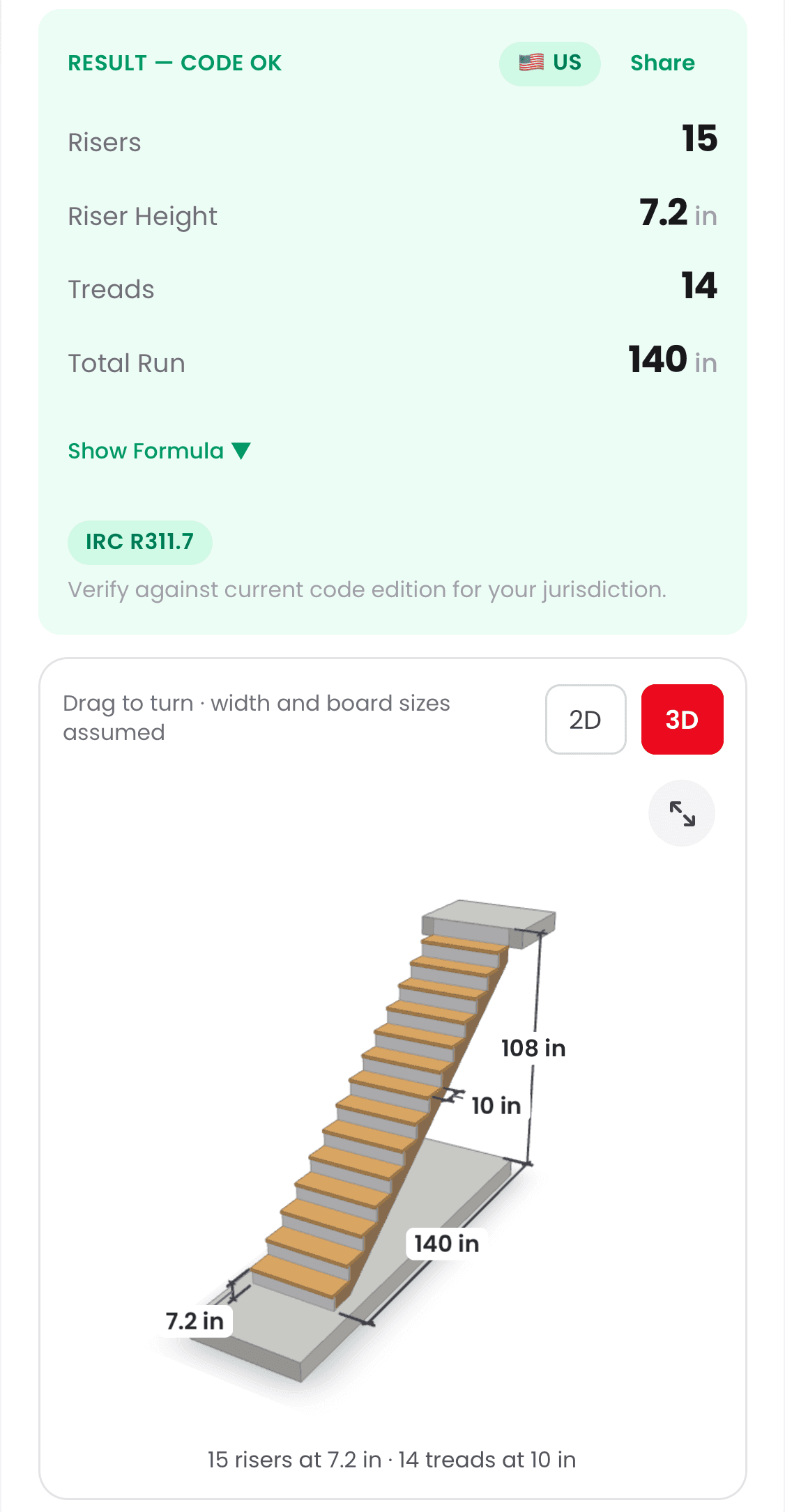
The risk in a feature like this is that the picture says more than the calculator did. A model that looks precise and is partly invented is worse than no model at all, so most of the design went into keeping it truthful.
First Version: SVG
The first drawings were SVG. A small engine took closed outlines, pushed them out into solids, turned them and drew them without perspective, sorting the faces from back to front.
That is a painter's sort, with no depth buffer behind it. It suits a slab or a single board. A hip roof with jack rafters, where pieces pass in front of and behind each other, is the kind of model it was never going to draw well.
Four days after the SVG diagrams landed we replaced the 3D path with a GPU renderer. The SVG stayed. It is the loading placeholder and the fallback, and SVG is also how a drawing gets into a PDF.
Pieces First, Rendering Second
Every model starts in a file of pure functions with no React and no GPU in it. A builder takes the calculator's inputs and result and returns a list of parts (boxes, extrusions, where each one sits) and a list of dimensions to label.
The rules for a builder are short.
- The piece count equals the calculator's result. If the calculator says 14 studs, the wall has 14, and a test holds the builder to that.
- Only values the user entered or the calculator returned get a label.
- Anything the model had to assume is named in the caption. The concrete slab draws wire mesh, so its caption says wire mesh at 6 in is assumed. The stair above says width and board sizes assumed.
- If the model isn't to scale, it says so.
There is a cap of 400 pieces. Past it, the model draws the first sections and ends in a break mark, the same convention a drawing uses for a long member. A stud wall shows every stud up to 41 and the first 30 beyond that.
Because the builders are pure, they run in the ordinary test suite with no device. That also made them the easy part to reuse when the desktop app needed the same models.
Rendering
The renderer is three.js with its WebGPU renderer, running on react-native-webgpu. The decisions that mattered:
One mesh and one edge set per model. A 20 by 8 ft block wall came to 186 pieces. Drawn as 186 objects it would be 186 draw calls, so the parts are merged into a single mesh with one set of edge lines over it.
Labels are native views. Dimension text is ordinary React Native text placed over the canvas. Each label's position comes from a Reanimated shared value updated on every frame, so turning the model never re-renders the page. In the profiler, a five second orbit produced one React commit.
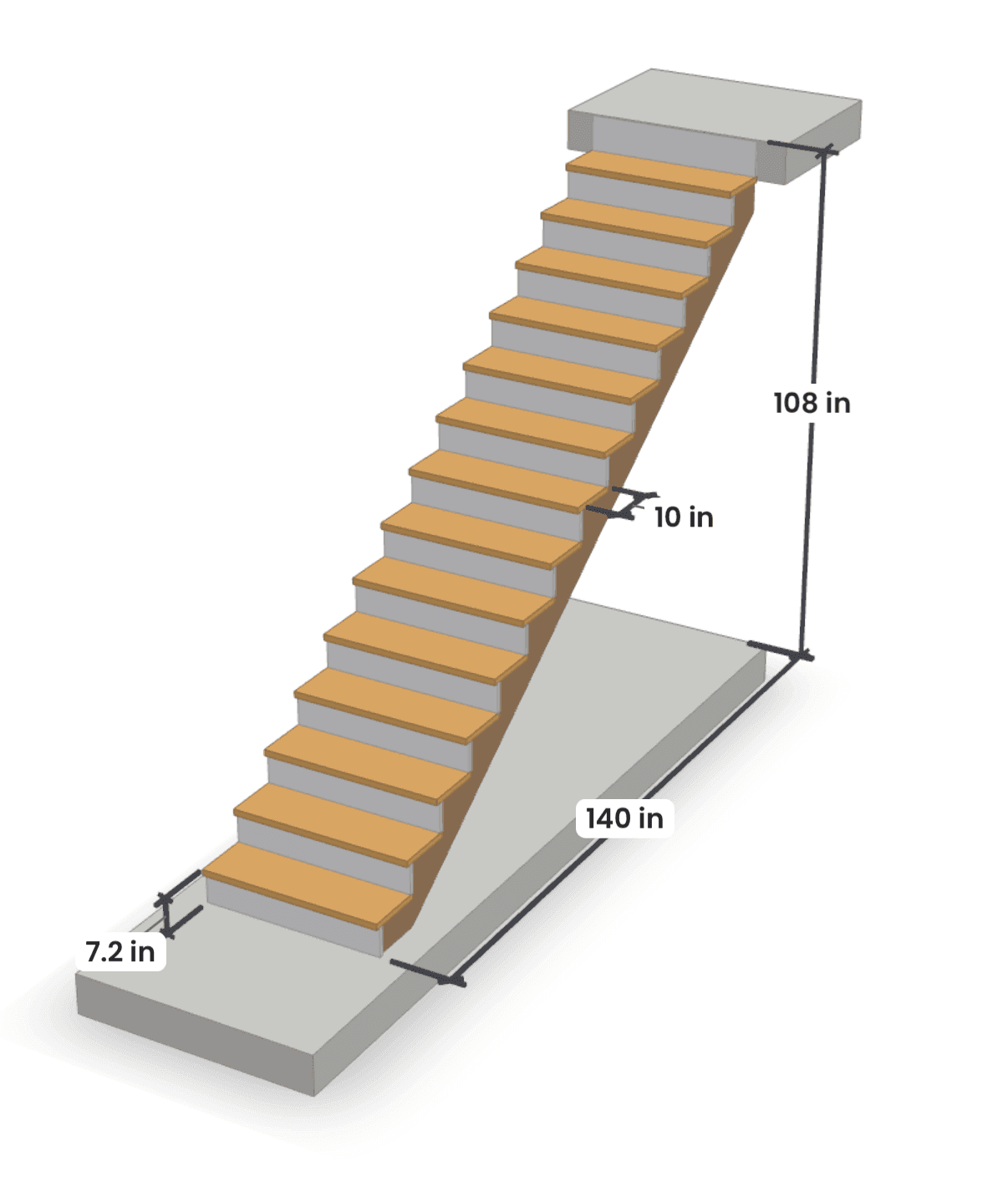
Labels move before they hide. When two labels would overlap, one slides out along a thin leader line. Early builds simply hid the loser, which meant the gap between fence pickets was never labelled at the card's zoom level.
The shadow is a mesh. Shadow maps shaded a whole square under the model. What shipped is a soft footprint, a blurred shape of whatever stands on the floor.
The SVG is the placeholder. After a cold start, three.js takes a while to load and build its shaders. We measured 574 to 686 ms to the first frame on a fresh JavaScript load, and around 175 to 200 ms after that. The SVG drawing of the same model shows from the first frame after the tap and is swapped for the GPU frame when it arrives, so nobody looks at an empty box.
Those timings are from the iOS simulator during development, as is the orbit speed: 52 to 58 frames a second, and 54 to 56 on the 186-piece wall. Treat them as a guide to proportions. They are not a benchmark of anyone's phone.
Things That Didn't Work
Sharing materials between canvases. The card and the full-screen view each mount a canvas, and the second one still took about 200 ms to its first frame. We tried sharing materials across them and measured 232, 335 and 232 ms, which is no gain. The time goes into three.js building its render objects for each mesh, and fixing that means reusing meshes across canvases. We reverted the change and left it.
A fixed canvas shape. A 4:3 canvas couldn't hold a long, thin model through a full turn. The card now takes its shape from the model's default view, anywhere from square to 16:9.
Full resolution on dense screens. A 3x screen has 2.25 times the pixels of a 2x one, and on a small diagram nobody could see the difference. The drawing buffer is capped at 2x.
The Fallback Bug
The library is loaded on first use, inside a try and catch, with the SVG model as the fallback. That looked safe and it wasn't.
On a build made before the native module was added, tapping 3D raised a fatal error on top of the fallback. In React Native a lazy require that throws is reported through the global error handler and returns undefined, so the catch block never ran. The fix was to ask the native module registry whether the module exists before requiring anything.
For us it only hit development builds made before the library went in. An over-the-air update can create the same situation for real users, when new JavaScript reaches a binary that doesn't contain the module. Our update channel is tied to a fingerprint of the native code, so that can't happen here, but plenty of apps key their updates to the app version and it can happen there.
What It Cost the App
A native GPU module isn't free to adopt.
- Android minimum went from API 24 to API 26. The plugin requires it. That drops Android 7.0 and 7.1.
- A native dependency. It needs a new binary through the stores. An over-the-air update can't deliver it.
- Desktop couldn't share the renderer. The piece builders carried over unchanged, but the rendering had to be ported by hand to three.js in a webview, with WebGL 2 as its fallback.
- PDFs can't run a GPU. A saved calculation stores the exact inputs its drawing was made from, and a pure SVG renderer redraws it in the report. The largest of those snapshots is 820 bytes.
If You're Considering 3D in Your App
A few questions are worth asking whoever builds it. What does the user see on a device where the GPU path fails? Which OS versions does it cut off? And where does the model get its numbers, from the same code as the result or from a second copy that can drift?
We'd build this the same way again. Next time we'd try the fallback on an old binary much earlier than we did.
FieldDojo is on the App Store and Google Play if you want to turn a stair around yourself, and the case study covers the rest of the app. If you're planning something with graphics like this in it, tell us what you're building.