Role
Design, web app, backend
An invoicing and collections dashboard for marketing agencies. It keeps the agency's fee separate from pass-through costs like ad spend, chases late invoices on a schedule, and forecasts when the cash will actually arrive.
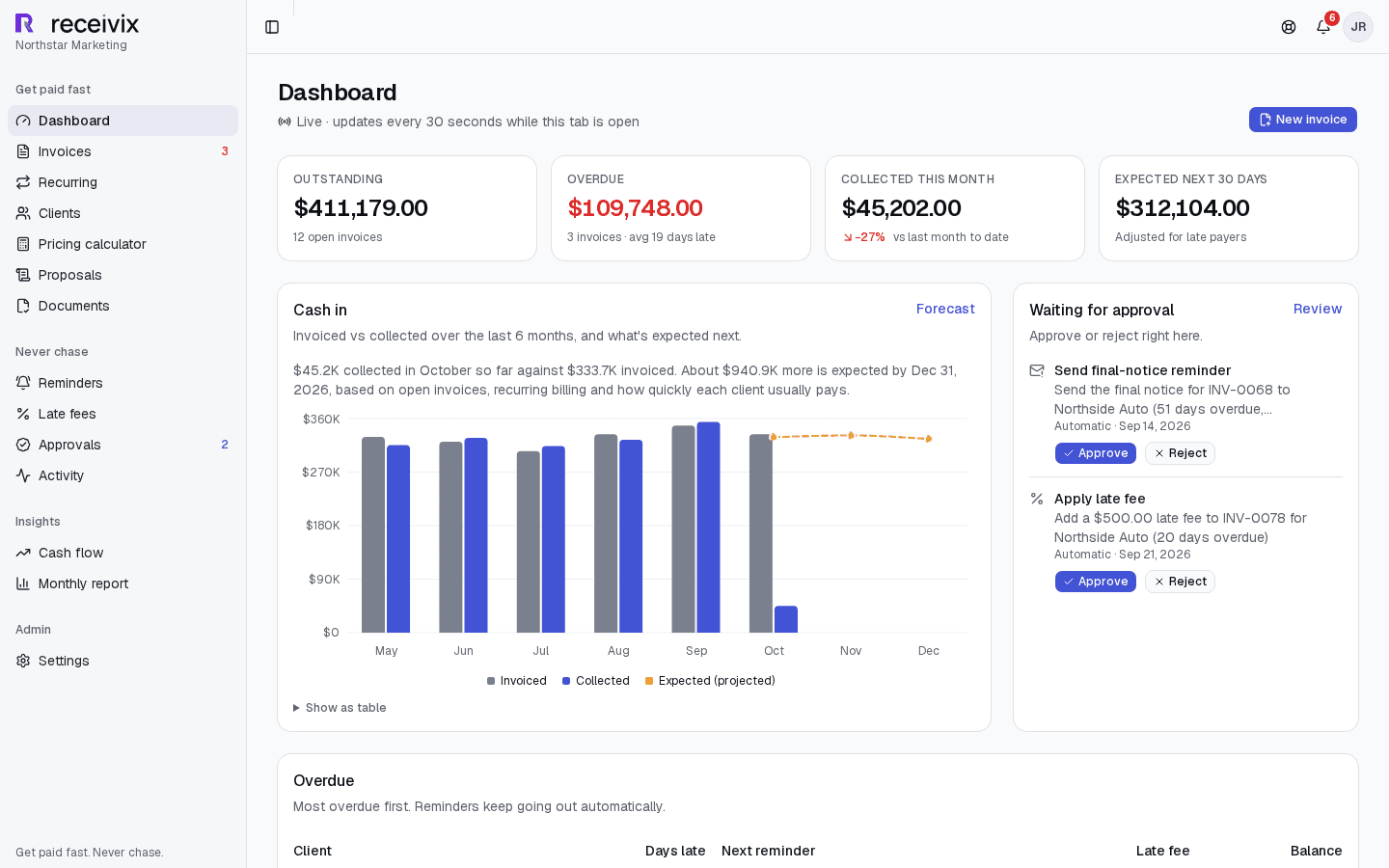
Receivix is a web dashboard for small marketing agencies, the kind with a founder, two to twelve staff, and somewhere between eight and twenty clients. It does two jobs. It gets invoices out in one click, and it chases the late ones so that nobody at the agency has to write the awkward third email.
This one is client work. The founder came to us with a twelve-section written brief and the two offers the product would be sold on, Get Paid Fast and Never Chase. We turned the brief into a design spec, a data model, and a build plan, and built the first version from those.
It is not live yet, which is why this page has no link to click. The first version covers both halves of the brief and runs end to end on seeded demo data. The agency in the screenshots, Northstar Marketing, is fictional. Online card payments and real accounting connections are still ahead of it, and today the QuickBooks sync is an interface with a stub provider behind it.
Two parts of the work are written up on the blog: how the client's brief became a build plan, and how the collections logic handles reminder timing, late fees, and jobs that run twice.
A marketing agency's invoice often carries two very different kinds of money. The management fee is the agency's revenue. Pass-through costs are not. Ad spend is the usual one, the client's budget on its way to Google or Meta, and it can be several times the size of the fee. Generic invoicing tools add everything into one total, which overstates revenue and muddles tax. When spend is billed after the fact, a late payment also leaves a much bigger hole than the fee alone.
Chasing is the other half of it. At an agency this size the person sending payment reminders is usually the founder, who also owns the client relationship, so reminders go out late or not at all.
And without a clean record of what is owed and how late each client tends to pay, planning cash even a few weeks out is guesswork.
We treated the money rules as the product and the screens as a way of looking at them. Anything that decides an amount, a date, or a status is a pure function with tests. Anything that sends an email or changes an invoice goes through one narrow path.
Pricing, late fees, invoice status, billing periods, reminder timing, and the forecast live in a framework-free library covered by 155 unit tests. Money is integer cents everywhere and rates are fractions, so rounding and formatting each happen in one known place.
Every invoice carries a copy of the pricing model and late-fee policy it was created under. Moving a client from 15% to 12% next quarter does not rewrite what last quarter's invoices say.
An invoice's status changes through a single function that checks the transition against a small state machine and logs it. Totals are recomputed by one other function. Nothing else in the codebase is allowed to write those columns.
Six scheduled jobs generate recurring invoices, mark invoices overdue, apply late fees, send reminders, follow up on missing documents, and sync to accounting. Each is written so that a second run changes nothing and sends nothing, because schedulers retry and overlap whether you plan for it or not.
Final notices, late fees, voids, bulk sends, and client deletions pass through an approval gate. When a team member triggers one it becomes a pending request for the agency owner to approve or reject. Late fees need approval by default.
The brief left nine questions open, from how many clients an agency can hold to what counts as a month overdue. Each was settled in a written spec before feature code existed, along with the signature of every function that crosses between clients, invoicing, collections, and insights.
Every invoice line is a management fee, ad spend, or other. Subtotals, tax, and reports keep the three apart, and ad spend is untaxed by default because it is a pass-through. An agency with no ad spend to bill leaves that line off.
Percentage of spend, flat retainer, or a base fee plus a percentage. The calculator shows the fee for a given spend before anything is invoiced, and proposals reuse the same math.
Weekly, monthly, or quarterly schedules generate invoices billed up front or in arrears. Invoices billed in arrears wait as drafts until someone confirms the real ad spend.
The default sequence runs from three days before the due date to thirty days after, moving from friendly to firm to final. Each step is an editable template with merge fields, sent at a set hour in the agency's own timezone.
Fixed, monthly-percentage, or daily-percentage policies, set per agency or per client. The fee is recalculated from the invoice total each day instead of being stacked on yesterday's fee.
Sensitive actions from team members queue for the owner with a plain summary of what will happen. Duplicate requests for the same action collapse into one.
Open invoices are placed on the date each client is likely to pay, using that client's own average lateness, next to upcoming recurring invoices. The result rolls up into 30, 60, and 90-day buckets.
Clients open an invoice or proposal from a tokenised link with no login, on a page laid out for a phone first. A proposal can be accepted or declined there and converted into a client record.
Every state change writes an activity row, including the ones the system makes on its own. There is one feed that answers who did what to which invoice.
Receivix is one Next.js application, not a separate front end and API. Server Components read through tenant-scoped services, Server Actions handle writes, and the scheduled jobs are HTTP endpoints in the same deployment.
The rules live here: pricing, late fees, the invoice status machine, billing periods, reminder send times, forecasting. It imports nothing from the database or the framework, which keeps it cheap to test and lets the UI reuse the same functions for live previews.
Every service function takes a tenant context first and filters by agency id. Writes that send email run inside a transaction helper that holds the emails back until the commit succeeds, so a rolled-back payment never produces a receipt.
Six cron endpoints sit behind a shared secret. Email goes out through Resend with React Email templates, invoice PDFs are rendered with react-pdf, and uploads go to S3-compatible storage. In development, mail lands in a local outbox folder and files in a local directory, so the whole app runs without a single third-party account.
A reminder job that runs twice, or overlaps with itself, must not send a client the same email twice.
Each due reminder is processed in its own transaction. The row is selected FOR UPDATE SKIP LOCKED with a guard on its pending status, so a second worker skips it and a second run finds nothing to do. The reminder log has a unique key on invoice and step, which makes one table both the schedule and the history.
An invoice sent late should not fire every reminder it has already missed.
Send times are computed at the moment the invoice is sent, and any step whose time has already passed is marked skipped right then. If the job itself falls behind and several steps come due together, only the latest goes out and the earlier ones are recorded as superseded.
Nine o'clock on the due date is a different instant for every agency, and it moves twice a year.
Calendar dates are stored as plain dates with no time attached, and today is always worked out in the agency's timezone. A reminder set for 9am is converted to a UTC instant per agency with daylight saving taken into account, so it arrives at 9am local in July and in December.
Agencies upload a logo and invoice PDFs are rendered on the server. A saved logo URL must never become a way to make the server fetch something.
The renderer never fetches a remote URL. A logo is either an upload inside that agency's own branding folder or an inline data URI, and anything else falls back to the agency name in text. A test passes a cloud metadata address and asserts that no network call happens at all.
Tell us about your project. Notchip scopes, designs, and ships on a milestone basis — you only pay for results.
Start a project